Lesson 3: Positioning
Positioning is the most important part of a website, no ammount of flashy effects and styles will make your website look good unless your layout is nailed. For this we must discuss the box model.
Lesson:
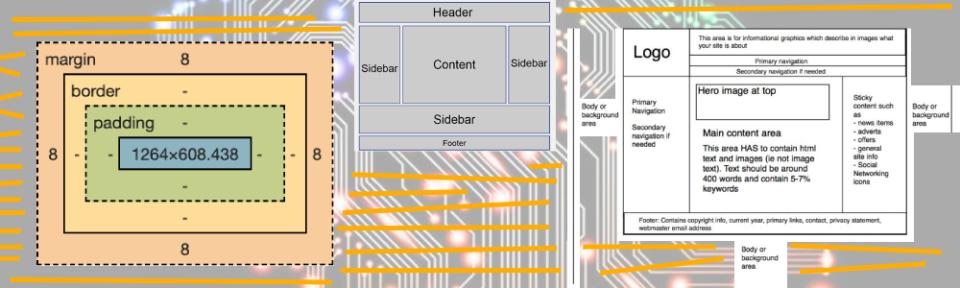
The box model is a depiction of the hierarchy of positionning commands, an image of the box model is drawn below.

The Content in the centre is whatever you are targetting, for example if I were targetting body the box would take place over the whole website, but if I targeted header it would encompass only the words in the header tag, and if I reuse the header tag it would apply the same transformations to that one too.
Note: Adding margins, padding, etc is the same as adding any other style, your offset value can be in pixels or percent of your screen.
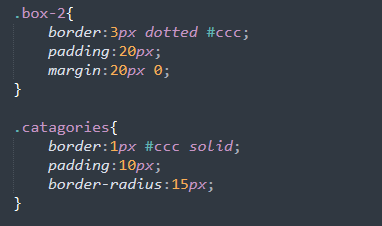
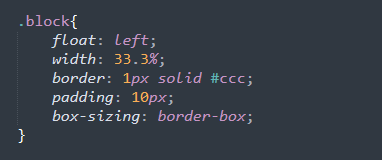
Say you wanted to have these boxes of text next to eachother. you would need to use percentage placement for one, and also you need to use a command that places all contents of your border inside that percentage so that it doesnt push one of the boxes down. this command is called box-sizing: border-box;. you tag it at the end of your style like so:
Homework:
- Step 1: Use padding and margins to enhance your previous webpage. Many people don't like sites where too much is squished onto your screen.
- Step 2: Add 3 adjacent boxes to your site. Make sure they stay adjacent to each other even when resizing your window.
- Step 3: Add a sidebar.
- Step 4: In both the sidebar and 3 adjacent boxes, use different padding, margins, and colours to make each one look unique.