CSS Lesson 2
There are hundreds of different styles you can use when programming in css. In this lesson we are going to familiarize ourselves with some of the more essential ones.
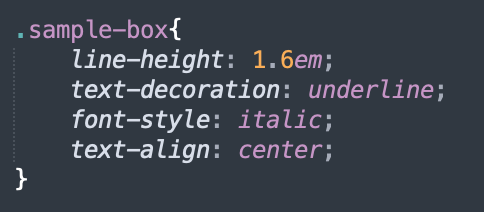
- Style 1: line-height, used to space out lines of text. 1.6em (em is a unit) is standard. You don't have to use em, px (pixels) work just as well.
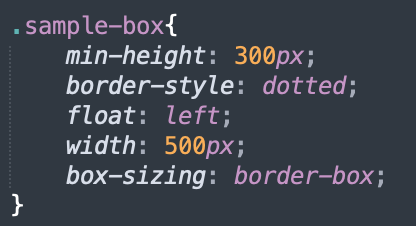
- Style 2: min-height, sets the minimum height for the element you are targetting. Usually used to ensure that elements are the same height no matter the window size
- Style 3: text-decoration, used to add decorations to text, such as underlines
- Style 4: border-style, used to give different types of borders to elements. For example, dotted, dashed, solid, double.
- Style 4: float, used to place objects on the screen. Examples are center, left, right.
- Style 5: width, sets the width of an element in px.
- Style 6: box-sizing, used to give boxes/elements specific properties. For example, the border-box style used with box-sizing makes the box resize with the window.
- Style 7: text-align, used to align text, similar to how float is used.
- Style 8: background-position, used to position background images. For example, left, right, center, center right, top, bottom.
- Style 9: font-size, gives the font a size in px.
- Style 10: font-family, specifies which fonts will be used for the text in the targetted elements
- Style 11: font-style, used to make text bold, put into italics, or inherit font styles.
Styles are called like this, "font-size: 20px;" or "float: center;". You put the specific family of styles first, and then specify a quantity or give a value for that style after a colon. You must also end every line with a semi colon.
Below are images which show how the mentioned styles are used.
Styles used to style text can be seen in the below image
Styles used to style boxes can be seen in the below image
Homework:
On a new or existing HTML and css file, use all of the styles mentioned above in this lesson to create a simple webpage. Again, feel free to use W3Schools if you get stuck.