CSS Lesson 1
CSS is a language used to add "styles" to HTML files. CSS is essential to web development and can be very powerful if used correctly. CSS can be learned very quickly and this first lesson will get you started with the basics.
Getting started
Open Sublime text and open the HTML file you made during the HTML review. Then, open a new file and name "style.css". You will need to link this css file with your HTML file. We can do that by writing the following line of code in our HTML file, right underneath the title tags.
link rel="stylesheet" type="text/css" href="css/style.css"
with opening and closing triangle brackets (<,>) of course.
Now that we've linked our css file we can start adding styles to our HTML file.
We can start by giving our entire file some general styles. Type the code in the following image into your css file.

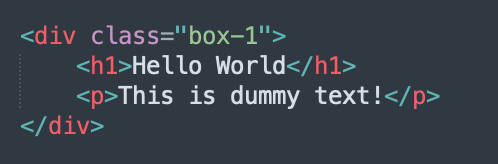
Now, lets make an opening div tag and give it a class by typing "class="box-1"" after the word div in the opening div tag. Lets also give it a header by using h1 tags and some random text by using p tags. Your code should look like the following image;
We can now add styles to this class by typing ".box-1" into our css file, followed by an opening curly bracket. Inbetween the braces we put whatever styles we want. For now, lets just change the background colour, text colour, border thickness and colour, and border width. Your code should look like the following image;
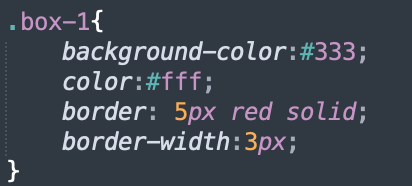
You can also target individual tags in the class by typing which tag you would like to target after typing .yourclasshere but before the curly braces. Similarly to classes, you can give tags id's, which are targetted with a #sign instead of a period.
Homework:
- Step 1: Make a brand new HTML file and css file, link them together.
- Step 2: Make the page display a red header using a div tag with a class of box-1.
- Step 3: Add some dummy text in your div tags. Put a border around the whole thing and make the border a bright blue colour (you can use an online colour picker to pick what shade of blue you want).
- Bonus!: Use the text-decorations style tag to underline your dummy text.
Solutions:

